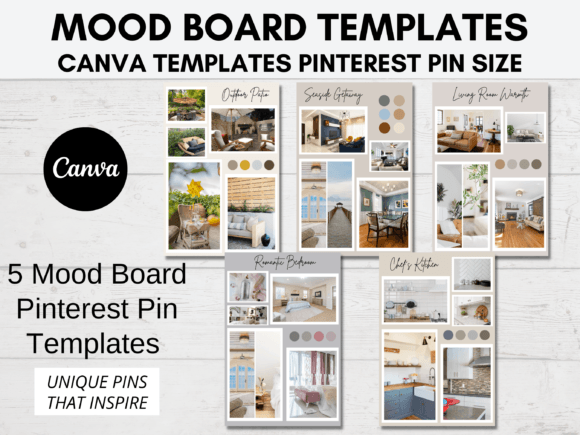
Mood Board Template for Canva Pinterest: Visualizing Your Brand
Every successful project, whether it's a product launch, a blog redesign, or a new social media strategy, begins with a single, powerful idea. The challenge is often capturing that intangible feeling—the aesthetic, the tone, the energy—and translating it into something tangible you can share with clients, collaborators, or even just yourself. This is where a mood board becomes your most valuable creative asset. It’s more than just a collage; it’s the visual story of your project before a single line is drawn. A well-crafted Mood Board Template for Canva Pinterest streamlines this process, turning abstract inspiration into a clear, actionable direction.
The Anatomy of an Effective Visual Compass
So, what exactly are you getting with a set of mood board templates? Think of them as pre-designed frameworks for your creativity. Each template provides a distinct layout and structure, allowing you to focus on populating it with your ideas rather than wrestling with alignment and composition from scratch. The visual personality of these templates is intentionally versatile—they act as a clean, elegant stage for your content to shine. The appeal lies in their balance: they are polished and professional enough for a client presentation, yet personal and inspiring enough for your own creative journaling. The consistent use of white space, intuitive placeholder text, and thoughtful grid systems ensures your final board looks cohesive, regardless of the images or colors you choose.
The true strength of a digital mood board lies in its adaptability. A single board can serve as the cornerstone of your entire brand identity exploration. By curating a collection of images, textures, color swatches, and even typographic samples, you begin to define the visual language of your business. You might include a snippet of a serif font that conveys tradition, paired with a clean sans serif font for modern clarity. You could add a swatch of a handwritten font to inject a touch of personality. This process of curation helps you make deliberate choices about the design assets that will represent your brand, ensuring every future piece of editorial design, web design, or packaging design feels unified.
From Pin to Practice: Strategic Applications
While the name highlights Pinterest, the utility of a Mood Board Template for Canva Pinterest extends far beyond a single platform. The optimized 1000x1500 pixel size is indeed perfect for creating engaging, vertical pins that stop the scroll, making it a fantastic tool for bloggers and marketers building a visual content library. However, the real power is in its application across your entire workflow. Use it to:
- Pitch a Project: Communicate a creative vision to a client or stakeholder visually, aligning expectations before expensive production begins.
- Guide Asset Creation: When working on logo design or social media graphics, refer back to your board to ensure color palettes, imagery, and even font pairings remain consistent.
- Plan Content Themes: For publishers and content creators, a mood board can define the visual tone for a quarterly content calendar or a specific campaign, ensuring all social media graphics feel part of a family.
- Explore a Personal Project: Hobbyists and crafters can use it to plan a room makeover, a wedding aesthetic, or a scrapbook theme, making the process more intentional and fun.
The templates are built for practical, hands-on use. The included instructions are designed to eliminate technical barriers, walking you through editing directly in Canva—a free, accessible platform. This means you can add your own images, swap out placeholder text, and adjust colors with a few clicks, either on your computer or via the Canva app. You’re not just buying a static file; you’re gaining a flexible tool that evolves with your project. The ability to test different font pairings within the template’s text boxes is particularly useful. You can see how a bold display font headline interacts with a body of text in a more neutral typeface, evaluating readability and visual hierarchy in real-time.
Making It Your Own: Practical Guidance
Choosing to use a mood board is a step toward more intentional design. To get the most out of a premium font or any creative asset, context is everything. Start by gathering inspiration before you even open the template. Save images from Instagram, pull color palettes from nature photos, or screenshot textures you love. Then, begin to edit. The templates are designed to be customized, so don’t be afraid to change the background color to match your brand or reposition the image placeholders to better suit your content.
A key consideration is how the mood board influences your broader brand perception. The images and creative font choices you include will directly signal your brand’s personality—whether it’s minimalist and sophisticated, bold and energetic, or organic and earthy. This consistency is what builds recognition and professionalism. When a client sees the same color story and typographic style across your mood board, proposal, and final website, it reinforces trust and clarity.
Remember, the goal is inspiration, not perfection. Use the mood board as a living document during your project’s discovery phase. It’s a safe space to experiment with a script font you’re curious about or to test if a vibrant color palette truly resonates with your audience. By the time you finalize your board, you’ll have a clear visual brief that guides every subsequent design decision, saving you time and ensuring your final product is cohesive and compelling. In the end, a great mood board doesn’t just look beautiful—it works hard, turning your initial spark of an idea into a unified, professional reality.